


Heading Background
Heading Background
Heading Background
AI/ML Model Operations

Too Hot, Too Cold: Finding the Goldilocks Zone in AI Serving

Every AI inference system lives between two extremes:

Too many warm workers ⇒ great latency, ugly GPU bill.
Too few (or none) ⇒ cold-start spikes and timeouts.

Finding the Goldilocks zone — where response times stay low without burning through your GPU budget — is the essence of efficient AI serving.

The Cost of Cold Starts

Cold starts happen when your serving stack needs to spin up a new worker before it can process a request. That means:

  • Launching a container

  • Initializing CUDA context

  • Loading model weights into VRAM

  • Possibly compiling runtime graphs (TensorRT, ONNX Runtime, etc.)

For large models, that can take 5–10 seconds — an eternity for interactive workloads. Under bursty traffic, these startup delays surface as tail-latency spikes, failed requests, and wasted GPU capacity kept idle “just in case.”

Cold starts are not just a performance problem; they’re a cost allocation problem. Every second of startup time either inflates your bill or erodes your user experience.

Defining Success: Latency as an SLO

Before tuning, define what “good” means.

A practical example:

p95 latency ≤ 800 ms

Requests beyond that threshold represent SLO debt — the hidden cost of cold starts.

You can even chart it:

SLO debt = % of requests exceeding p95 due to cold-start latency

If that debt grows, your “warm pool” isn’t big (or smart) enough.

Tiered Warmth: Not All Pods Need to Be Hot

A healthy serving architecture uses tiered warmth to match traffic patterns:

Press enter or click to view image in full size
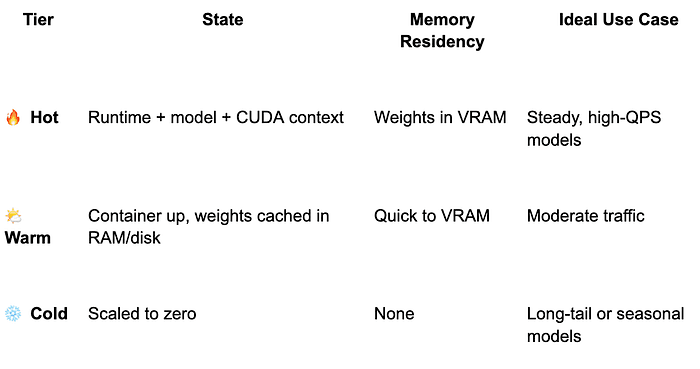

Promotion/demotion between tiers should follow real usage — not fixed timers. Use rolling averages of QPS or recent activity to adjust warmth dynamically.

4. Smarter Autoscaling Knobs

Traditional CPU metrics don’t work here — GPU load and queue depth tell the real story.

min_replicas: 1–3 # per hot model, traffic-weighted

scale_metrics:

- QPS

- inflight_requests

- gpu_util

- queue_depth

prewarm_triggers:

- on_deployment

- before_known_peaks (cron)

- when queue > X for Y seconds

cooldown_period: 30s

Avoid scaling solely on CPU utilization — that’s noise in GPU-bound inference.

5. Make Spin-Up Faster

If you can’t avoid cold starts, make them hurt less.

  • Prebuild inference engines (TensorRT, ORT) and cache on node.
    → Avoid runtime compilation delays.

  • Cache model artifacts locally.
    → No network pulls on scale-up.

  • Slim container images.
    → Smaller pulls, faster cold path.

  • Enable CUDA Graphs and pinned memory.
    → Reduce kernel-launch overhead.

  • Keep tokenizers/featurizers resident.
    → Avoid Python import or model-init overhead for preprocessing.

These changes often reduce cold-start latency from seconds to hundreds of milliseconds.

6. VRAM Residency & Model Eviction

VRAM is the new L3 cache — and eviction policy matters.

Keep a top-K set of models resident based on recent traffic or business priority. Evict least-recently-used models when VRAM pressure rises. For managed serving stacks (e.g., NVIDIA Triton), this can be scripted through the model repository API or custom scheduler hooks. This ensures you stay GPU-efficient while keeping critical models warm.

7. Routing & Batching

Latency doesn’t live in isolation — it depends on how traffic is steered.

  • Sticky sessions: Send repeat users to their existing warm pod.

  • Dynamic batching: Enable in Triton or TF-Serving; keep max queue delay ≤ 10 ms.

  • Admission control: Temporarily throttle low-priority traffic if queue depth spikes.

Together, these prevent unnecessary cold paths while boosting utilization.

Budgeted Trade-Offs

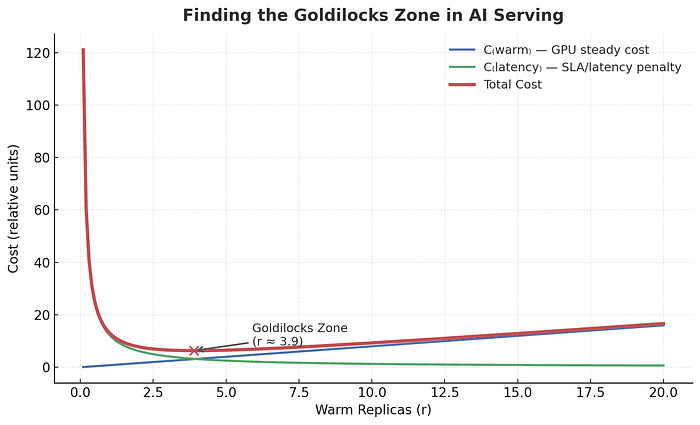
The number of warm workers you keep online isn’t a guess — it’s an economic decision.

Total Cost = Cwarm + Clatency_penalty

Where:

  • Cwarm = steady GPU cost of maintaining warm replicas

  • Clatency_penalty = cost of user latency, timeouts, or missed SLOs

Plot it and you’ll get a U-shaped curve: too cold, and you pay in latency; too hot, and you pay in GPUs. The sweet spot — your Goldilocks zone — is where total cost is minimized.

Press enter or click to view image in full size

Staying Just Warm Enough

Cold starts are the hidden tax of AI serving. The best teams don’t chase zero latency or zero cost — they find the equilibrium where latency stays within SLO, utilization stays high, and GPU waste disappears.

At ParallelIQ, we call this the “Goldilocks Zone of Serving” — just warm enough to deliver performance, and just lean enough to extend your runway.

🚀 Want to quantify your own Cwarm vs Clatency_penalty curve?
Our two-week GPU Efficiency Sprint benchmarks your serving stack and finds your Goldilocks zone — before the next billing cycle.


Every AI inference system lives between two extremes:

Too many warm workers ⇒ great latency, ugly GPU bill.
Too few (or none) ⇒ cold-start spikes and timeouts.

Finding the Goldilocks zone — where response times stay low without burning through your GPU budget — is the essence of efficient AI serving.

The Cost of Cold Starts

Cold starts happen when your serving stack needs to spin up a new worker before it can process a request. That means:

  • Launching a container

  • Initializing CUDA context

  • Loading model weights into VRAM

  • Possibly compiling runtime graphs (TensorRT, ONNX Runtime, etc.)

For large models, that can take 5–10 seconds — an eternity for interactive workloads. Under bursty traffic, these startup delays surface as tail-latency spikes, failed requests, and wasted GPU capacity kept idle “just in case.”

Cold starts are not just a performance problem; they’re a cost allocation problem. Every second of startup time either inflates your bill or erodes your user experience.

Defining Success: Latency as an SLO

Before tuning, define what “good” means.

A practical example:

p95 latency ≤ 800 ms

Requests beyond that threshold represent SLO debt — the hidden cost of cold starts.

You can even chart it:

SLO debt = % of requests exceeding p95 due to cold-start latency

If that debt grows, your “warm pool” isn’t big (or smart) enough.

Tiered Warmth: Not All Pods Need to Be Hot

A healthy serving architecture uses tiered warmth to match traffic patterns:

Press enter or click to view image in full size


Promotion/demotion between tiers should follow real usage — not fixed timers. Use rolling averages of QPS or recent activity to adjust warmth dynamically.

4. Smarter Autoscaling Knobs

Traditional CPU metrics don’t work here — GPU load and queue depth tell the real story.

min_replicas: 1–3 # per hot model, traffic-weighted

scale_metrics:

- QPS

- inflight_requests

- gpu_util

- queue_depth

prewarm_triggers:

- on_deployment

- before_known_peaks (cron)

- when queue > X for Y seconds

cooldown_period: 30s

Avoid scaling solely on CPU utilization — that’s noise in GPU-bound inference.

5. Make Spin-Up Faster

If you can’t avoid cold starts, make them hurt less.

  • Prebuild inference engines (TensorRT, ORT) and cache on node.
    → Avoid runtime compilation delays.

  • Cache model artifacts locally.
    → No network pulls on scale-up.

  • Slim container images.
    → Smaller pulls, faster cold path.

  • Enable CUDA Graphs and pinned memory.
    → Reduce kernel-launch overhead.

  • Keep tokenizers/featurizers resident.
    → Avoid Python import or model-init overhead for preprocessing.

These changes often reduce cold-start latency from seconds to hundreds of milliseconds.

6. VRAM Residency & Model Eviction

VRAM is the new L3 cache — and eviction policy matters.

Keep a top-K set of models resident based on recent traffic or business priority. Evict least-recently-used models when VRAM pressure rises. For managed serving stacks (e.g., NVIDIA Triton), this can be scripted through the model repository API or custom scheduler hooks. This ensures you stay GPU-efficient while keeping critical models warm.

7. Routing & Batching

Latency doesn’t live in isolation — it depends on how traffic is steered.

  • Sticky sessions: Send repeat users to their existing warm pod.

  • Dynamic batching: Enable in Triton or TF-Serving; keep max queue delay ≤ 10 ms.

  • Admission control: Temporarily throttle low-priority traffic if queue depth spikes.

Together, these prevent unnecessary cold paths while boosting utilization.

Budgeted Trade-Offs

The number of warm workers you keep online isn’t a guess — it’s an economic decision.

Total Cost = Cwarm + Clatency_penalty

Where:

  • Cwarm = steady GPU cost of maintaining warm replicas

  • Clatency_penalty = cost of user latency, timeouts, or missed SLOs

Plot it and you’ll get a U-shaped curve: too cold, and you pay in latency; too hot, and you pay in GPUs. The sweet spot — your Goldilocks zone — is where total cost is minimized.

Press enter or click to view image in full size


Staying Just Warm Enough

Cold starts are the hidden tax of AI serving. The best teams don’t chase zero latency or zero cost — they find the equilibrium where latency stays within SLO, utilization stays high, and GPU waste disappears.

At ParallelIQ, we call this the “Goldilocks Zone of Serving” — just warm enough to deliver performance, and just lean enough to extend your runway.

🚀 Want to quantify your own Cwarm vs Clatency_penalty curve?
Our two-week GPU Efficiency Sprint benchmarks your serving stack and finds your Goldilocks zone — before the next billing cycle.

Don’t let performance bottlenecks slow you down. Optimize your stack and accelerate your AI outcomes.

Don’t let performance bottlenecks slow you down. Optimize your stack and accelerate your AI outcomes.

Don’t let performance bottlenecks slow you down. Optimize your stack and accelerate your AI outcomes.

Don’t let performance bottlenecks slow you down. Optimize your stack and accelerate your AI outcomes.
